Salesforce for Marketers: Why Most Teams Waste 60% of Its Capability
I’ve spent the last four years helping e-commerce and SaaS companies fix their marketing infrastructure, and here’s what I keep seeing: businesses invest heavily in Salesforce, connect it to their WordPress sites and automation tools, then wonder why their attribution data looks like nonsense and their lead scoring produces rubbish.
The issue isn’t the platform—it’s that most marketers treat Salesforce like an expensive contact database instead of what it actually is: a first-party data engine that can power everything from AI-driven personalization to proper multi-touch attribution. This matters especially now, when third-party cookies are dying and privacy regulations are tightening. If you can’t track and activate your own customer data properly, your paid campaigns and content strategies will underperform regardless of how much you optimize them.
I learned this the hard way working with an e-commerce client last year. We were running sophisticated Facebook campaigns, beautiful email sequences, solid SEO—but conversion rates stayed flat. The problem wasn’t our channels. It was that Salesforce wasn’t talking to their WordPress checkout flow properly, so half our customer journey data was missing. Once we fixed the data architecture, we could actually see which touchpoints drove purchases and optimize accordingly. Revenue from returning customers jumped 28% in eight weeks.
How I Got Serious About CRM Architecture (Not Just Marketing Tactics)
Two years ago, I was doing what most marketing specialists do—optimizing landing pages, running A/B tests, building content strategies. Standard growth marketing work. Then I took on a client who’d spent £60K implementing Salesforce and Pardot, only to have their marketing team ignore it completely because “it’s too complicated” and “HubSpot was easier.”
When I audited their setup, I found the predictable mess: custom fields that duplicated standard ones, lead scoring based on completely arbitrary point values, campaign tracking that captured maybe 40% of actual marketing touchpoints. Their sales team was working from spreadsheets because they didn’t trust the CRM data. Marketing was making budget decisions based on Google Analytics while Salesforce showed completely different conversion numbers.
We spent three months rebuilding their data model from scratch—proper field mapping between WordPress forms and Salesforce objects, behavioral scoring based on actual conversion data from their closed deals, automated campaign association so attribution actually worked. Nothing revolutionary, just disciplined implementation of how Salesforce is meant to function.
The result: their cost per acquisition dropped 34% because we could finally see which channels and content types actually drove qualified pipeline, not just website traffic. The sales team started trusting the lead scores because they correlated with real buying intent. Marketing and sales began working from the same dashboard instead of arguing about whose numbers were “right.”
That’s when I realized most marketing problems that look like strategy or creative issues are actually data infrastructure problems in disguise.
What Salesforce Actually Does (And Why WordPress Users Especially Need It)
At ZAVIFY, we work primarily with WordPress-based businesses—e-commerce stores, SaaS companies with WordPress marketing sites, content publishers monetizing through courses or services. WordPress is brilliant for content management and SEO, but it’s terrible at tracking the full customer journey once someone leaves your site.
This is where Salesforce becomes crucial. When properly integrated with WordPress, it creates a persistent record of every interaction:
Someone reads your blog post (tracked via Google Analytics, synced to Salesforce if you’ve set it up properly). They download a lead magnet through a Gravity Forms submission (creates a Lead in Salesforce automatically). They receive a nurture sequence via Pardot (every email open, every click gets logged). They return to your site three times over two weeks visiting different product pages (tracked via Salesforce tracking code). Finally, they fill out a demo request form (converts the Lead to a Contact and Opportunity, with full campaign history intact).
Without Salesforce, you’d see these as disconnected events across different tools—GA4, your email platform, your form submissions, your CRM. With Salesforce, they’re one unified timeline attached to a person and a potential deal.
The catch is that WordPress doesn’t integrate with Salesforce automatically. You need proper connector plugins (I typically use either the official Salesforce WordPress plugin or custom API integrations depending on requirements), field mapping that makes sense for your business model, and tracking code implementation that actually captures the behavioral data you need.
Most agencies or in-house teams skip this work because it’s technical and boring. Then they wonder why their reporting is full of gaps.
The Pardot Naming Confusion (And Which One E-Commerce Actually Needs)
Salesforce’s marketing automation portfolio is deliberately confusing because they’ve acquired multiple companies and tried to rebrand them under the Marketing Cloud umbrella. Here’s what you need to know if you’re trying to figure out which product you actually need:
Pardot (now called Marketing Cloud Account Engagement) is for B2B companies with longer sales cycles. Think SaaS products, professional services, B2B e-commerce. If your average deal takes weeks or months and involves multiple decision-makers, you want this one.
Marketing Cloud (the original product) is for high-volume B2C marketing—millions of emails, SMS campaigns, push notifications, journey mapping for transactional flows. Think Amazon-scale e-commerce or subscription apps.
I work mostly with small to mid-sized e-commerce businesses and SaaS companies, so Account Engagement (Pardot) is usually the right fit. It integrates more deeply with Sales Cloud, the lead scoring is more sophisticated, and the campaign tracking is built around the “nurture over time” model that B2B needs.
But here’s where people get confused: if you’re running a WooCommerce or Shopify store doing primarily one-step checkout transactions, you might not need either. Standard Salesforce with good WordPress integration might be sufficient. Save the marketing automation investment until your customer journey actually justifies the complexity.
Campaign Attribution: Where SEO People Especially Struggle
I come from an SEO background (Google certified, worked extensively with Ahrefs and Search Console), so I understand why organic marketers find Salesforce attribution confusing. SEO attribution is already messy—you’re dealing with dark social, branded vs. non-branded, assisted conversions, multiple sessions before conversion. Then you add Salesforce campaign tracking on top and it becomes genuinely complicated.
Here’s the core concept that took me months to fully grasp: Salesforce campaigns are not the same as Google Analytics campaigns. In GA4, a campaign is usually a UTM parameter on a URL. In this multi-touchpoint framework, evaluating wowza alternatives helps teams align streaming and video delivery tools with campaign goals while tracking performance more holistically across channels.
When someone converts through organic search, Salesforce needs to know which campaign to associate that lead with. Did they find you through a blog post that’s part of your content marketing campaign? Did they land on a product category page that’s part of your SEO program? Did they come from a guest post you published on another site?
If you don’t set up proper campaign tracking, all your organic leads get lumped into a generic “Website” or “Organic Search” campaign, and you lose all attribution granularity. You can’t tell which content topics drive qualified leads, which landing page templates convert better, which backlink campaigns actually produce pipeline.
The fix I use: create Salesforce campaigns for each major content cluster or SEO initiative, use UTM parameters consistently (even for organic content), and connect those UTMs to campaign association rules in Salesforce. Then when someone from organic search fills out a form, Salesforce automatically assigns them to the right campaign based on which page they converted on.
This gives you proper attribution for SEO, which most marketers never get because they’re only looking at GA4’s last-click model.
Real Example: Fixing Lead Scoring for an E-Commerce SaaS Client
Last year I worked with a SaaS company selling inventory management tools to e-commerce stores. They had Pardot set up with lead scoring, but their sales team complained that most “hot leads” never responded to outreach and most deals that actually closed had been scored as “cold.”
When I analyzed their scoring model, the problem was obvious. They were using standard B2B scoring logic:
- Downloaded whitepaper: +25 points
- Attended webinar: +50 points
- Visited pricing page: +10 points
- Email opens: +3 points each
- Job title contains “Manager” or “Director”: +20 points
This looks reasonable if you’re selling enterprise software. But their actual customers were small e-commerce business owners who rarely attend webinars, don’t care about whitepapers, and often have job titles like “Founder” or “Owner” that weren’t getting scored at all.
I pulled their Salesforce opportunity data and ran correlation analysis (basic Python script analyzing which behaviors actually predicted closed deals). The real signals were completely different:
- Connected a store to the free trial via API: 73% conversion rate
- Watched the product demo video: 41% conversion
- Visited the integrations page: 38% conversion
- Downloaded their “E-commerce Inventory Checklist” (practical tool, not thought leadership): 31% conversion
- Attended webinar: 12% conversion
We completely rebuilt the scoring model based on actual behavior that correlated with purchases, not generic B2B best practices. API connections became an instant 100 points with automatic sales notification. Demo video views got 50 points. Webinars dropped to 15 points. We added negative scoring for behaviors that predicted low intent (repeatedly visiting the same page without progressing, opening emails but never clicking).
Qualified lead conversion rate improved from 8% to 22% in two months. The sales team actually started trusting the scores because they reflected real buying signals specific to their product and customer base.
The lesson: Salesforce gives you the infrastructure, but you have to configure it based on your actual data, not generic best practices from SaaS companies selling to Fortune 500 enterprises.
Understanding the Object Model (For Non-Technical Marketers)
This part is a bit technical, but if you’re integrating Salesforce with WordPress or managing the marketing side, you need to understand how Salesforce organizes data. It’s built around objects, which are basically database tables with relationships between them.
The key objects for marketers:
Leads: Unqualified prospects who’ve shown interest but haven’t been vetted yet. When you capture a form submission on your WordPress site, it typically creates a Lead. Once sales qualifies them, the Lead gets converted into an Account, Contact, and potentially an Opportunity.
Contacts: Qualified individuals attached to an Account (company). Once someone is a Contact, they stay in your system permanently. This is important for e-commerce—if someone buys once, they should be a Contact, not a Lead, so you maintain purchase history.
Accounts: Organizations or companies (for B2B) or individual customer records (for B2C). Your customer relationship is really with the Account.
Opportunities: Active deals or purchase possibilities. Each Opportunity has a value, a stage (Prospecting, Proposal, Negotiation, etc.), and a close date. For e-commerce, an Opportunity might represent a potential enterprise purchase or a high-value subscription upgrade.
Campaigns: Your marketing initiatives—content offers, webinars, email campaigns, SEO landing pages. Leads and Contacts can be Campaign Members, which is how Salesforce tracks which marketing activities influenced which deals.
The relationships matter enormously. If you’re trying to measure ROI from your SEO campaigns but your WordPress form submissions create Leads that sales manually converts to Contacts without maintaining campaign associations, your attribution data will be incomplete. You’ll systematically underreport the impact of top-of-funnel activities.
When I audit Salesforce implementations, broken relationships are usually the problem, not missing features.
Framework: When to Use Salesforce Native vs. Third-Party Tools
| Marketing Function | Salesforce Capability | When I Use Integration | When Salesforce Isn’t Enough |
|---|---|---|---|
| WordPress form capture | Web-to-Lead or plugin integration works fine | Use Gravity Forms + Salesforce plugin for complex forms with conditional logic | High-volume lead gen (50K+/month)—API rate limits become an issue |
| Email marketing automation | Pardot handles basic nurture, segmentation, behavioral triggers | For sophisticated e-commerce email (abandoned cart, browse abandonment), I prefer Klaviyo or ActiveCampaign | Complex product recommendation engines—Salesforce email personalization is limited |
| Landing pages | Pardot has basic LP builder | Nearly always use WordPress with Elementor or custom builds—far more flexibility | Never, actually—WordPress is always better for landing pages |
| SEO & content tracking | Can track via custom fields and campaign associations | Connect Search Console, Ahrefs, and GA4 via API or Zapier for automated reporting | Real-time keyword ranking and backlink monitoring—need dedicated SEO tools |
| E-commerce transactions | Can store order data via API integration | Use WooCommerce or Shopify native integrations—much cleaner | High-frequency transactions (thousands daily)—Salesforce gets expensive and slow |
| AI-powered personalization | Einstein (Salesforce’s AI) provides some predictive scoring | For generative AI content or advanced recommendations, integrate OpenAI API or custom models | Real-time website personalization at scale—need specialized tools like Dynamic Yield |
The pattern I follow: use Salesforce for what it’s genuinely good at (storing customer data, tracking campaigns, managing pipeline), integrate best-of-breed tools for specialized functions (WordPress for content, dedicated email platforms for transactional flows), and use APIs or middleware to keep everything synchronized.
Five Mistakes I See Constantly (Including Ones I’ve Made Myself)
1. Implementing Salesforce before your data collection is clean
I made this mistake early on. Set up Salesforce for a client, integrated their WordPress forms, started building dashboards—then realized their form data was garbage. People were entering company names in the “Last Name” field, email validation wasn’t working, phone numbers were formatted inconsistently. Salesforce just stored all this messy data faithfully.
Fix this on the WordPress side first with proper form validation, required fields, and data formatting before it enters Salesforce. It’s much easier to prevent bad data than clean it later.
2. Over-customizing the data model immediately
Salesforce lets you create unlimited custom fields and objects. New administrators see this flexibility and immediately start building elaborate custom schemas because the standard Lead and Contact objects feel limiting.
Then six months later you realize you’ve recreated functionality that already existed, and now nothing integrates properly because third-party tools don’t recognize your custom structure.
I follow a rule now: use standard fields and objects until you absolutely can’t, then customize minimally. If you can solve a problem by using an existing field in a creative way rather than creating a new one, do that.
3. Ignoring mobile optimization for sales team access
Marketing people typically work on desktop and forget that sales teams are often accessing Salesforce on mobile—at trade shows, in client meetings, traveling between appointments. If your Salesforce implementation requires scrolling through 30 fields to update an Opportunity, your sales team won’t use it.Implementing robust MDM solutions ensures that all devices stay secure and managed, allowing seamless collaboration without compromising company data.
Design for mobile-first usage. Show only essential fields, use logical page layouts, implement quick actions for common tasks. Test everything on an actual phone.
4. Not maintaining the WordPress-Salesforce connection actively
Plugins and integrations break. WordPress updates, Salesforce updates, something changes and suddenly your form submissions stop syncing or your campaign tracking stops working. Most teams don’t notice until weeks later when someone asks why lead volume dropped.
I set up monitoring for all integration points—automated tests that submit dummy forms and verify they appear in Salesforce, alerts if sync errors exceed a threshold, weekly audits of data flow. Boring operational work, but it prevents catastrophic gaps in your data.
5. Building reports that look impressive but don’t drive decisions
Early in my career I built elaborate Salesforce dashboards with colorful charts showing all sorts of metrics—lead velocity, campaign influence, pipeline coverage, win rates by source. Leadership loved them in presentations.
But when I asked what decisions those dashboards were informing, nobody had clear answers. They were impressive visualizations of data, not actionable business intelligence.
Now I start with the decision: “Should we increase budget for paid search or content marketing?” Then I build the report that answers that specific question—cost per opportunity by channel, time to close by source, deal size variations, long-term customer value. Focused, decision-oriented reporting rather than comprehensive dashboards nobody actually uses.
When Salesforce Is the Wrong Choice (And I Tell Clients That)
I make money helping implement and optimize Salesforce, but I’ve turned down projects where it’s not the right fit:
Very early-stage startups: If you’re pre-product-market-fit with fewer than 50 leads per month and a founder doing all the sales, use something lightweight like Pipedrive, Copper, or even a well-structured Airtable. Salesforce adds complexity you don’t need yet.
Pure affiliate or AdSense businesses: If your revenue model is traffic-based (display ads, affiliate commissions) with no direct customer relationship, Salesforce offers minimal value. Stick with WordPress, GA4, and maybe an email platform.
Teams with no technical resources: Salesforce requires ongoing administration—building reports, managing integrations, troubleshooting sync issues, optimizing workflows. If you don’t have someone technical on staff or budget for a Salesforce admin, you’ll end up with an expensive database that’s poorly maintained and underutilized.
Organizations with political data silos: If sales and marketing won’t agree on field definitions, process, or who owns which data, Salesforce won’t fix that. It’ll just become another battleground. The platform works when there’s organizational commitment to operating from shared truth.
For most of those cases, I recommend starting with HubSpot (more opinionated, makes more decisions for you, easier to use) or staying with lightweight tools until the business complexity justifies Salesforce’s power and cost.
What Actually Matters: My Strategic Position After Four Years
After implementing Salesforce for dozens of businesses—e-commerce stores, SaaS companies, WordPress agencies, service businesses—I’ve become convinced the platform’s value comes down to three things:
First-party data ownership in a post-cookie world: You control this data completely. Google can’t deprecate it, Facebook can’t change API access, Apple can’t block it with privacy features. As tracking becomes more restricted (which it will, continuously), businesses that own clean first-party data have a massive advantage.
Unified customer view across all touchpoints: When someone interacts with your content, fills out a form, opens an email, makes a purchase, contacts support, requests a demo—if all that data lives in one system with proper relationships, you can make dramatically better marketing and sales decisions. But this only works if you maintain data quality and process discipline.
Infrastructure that scales as your business gets more complex: Small businesses don’t need Salesforce. But once you have multiple products, multiple customer segments, partner channels, field marketing, complex attribution requirements, international operations—you need enterprise-grade infrastructure. Salesforce grows with you in ways that simpler tools can’t.
The requirement is proper implementation and ongoing maintenance. Salesforce doesn’t deliver value automatically—it delivers value when operated by someone who understands relational databases, marketing attribution, and how to connect different systems together without creating data chaos.
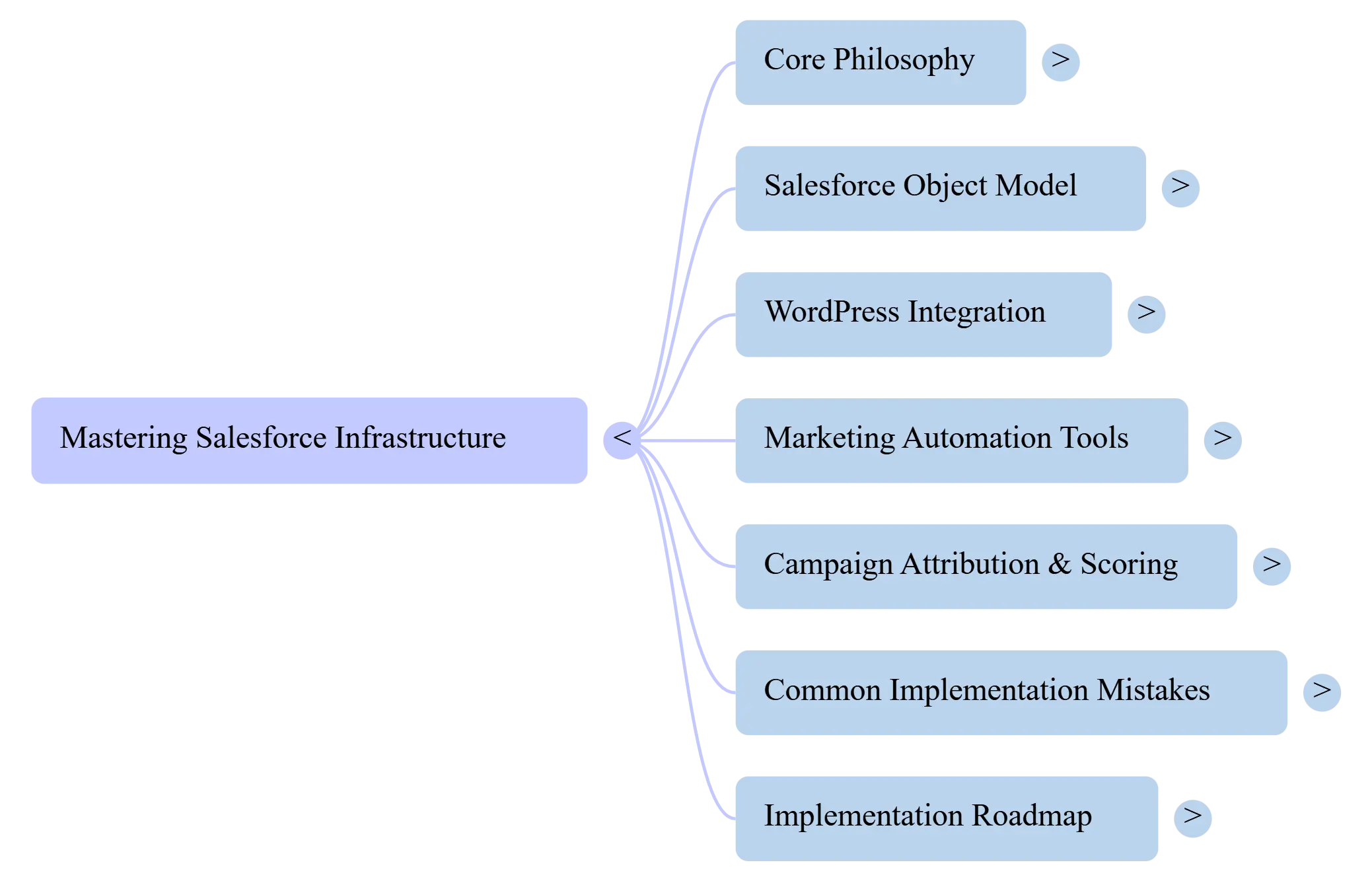
Practical Next Steps (If You’re Convinced This Matters)
If you’re starting from scratch with Salesforce:
Month 1: Implement Sales Cloud basics. Get comfortable with Leads, Contacts, Accounts, Opportunities. Connect your most important lead source (probably WordPress forms via Web-to-Lead or a good plugin). Verify data flows correctly before adding complexity.
Month 2: Clean up your data collection on the WordPress side. Implement proper form validation, required fields, consistent formatting. Fix the input before you worry about what Salesforce does with it.
Month 3: Add basic campaign tracking. Create campaigns for your main marketing initiatives (content program, paid search, email nurture), associate leads with campaigns when they convert, start building attribution reports.
Month 4+: Only after those foundations are solid, consider adding Pardot/Account Engagement for marketing automation. The automation layer depends on clean CRM data—if your foundation is broken, automation amplifies the problems.
If you already have Salesforce but it’s underperforming:
Week 1: Audit data quality. Pull all leads from the last 90 days, check for missing fields, duplicates, garbage data. Identify where your data collection process is breaking.
Week 2: Review campaign structure and attribution. Are you actually tracking which marketing activities influence deals, or just creating campaign records nobody uses? Fix campaign association workflow.
Week 3: Interview your sales team. What data do they actually need vs. what fields exist? What fields do they look at before calling a lead? What information is missing that would help them close deals? Simplify aggressively based on actual usage.
Week 4: Rebuild one core report that drives a real decision (budget allocation, channel prioritization, content investment). Make it accurate and actionable. Then build another. Incrementally replace vanity metrics with decision-driving insights.
The honest truth about Salesforce for marketers—especially those of us coming from SEO, WordPress, or content backgrounds—is that it’s powerful infrastructure that requires technical thinking most marketers aren’t trained for. You can’t just “set it and forget it” like you might with a WordPress plugin.
But once you understand the data model, maintain clean integrations, and build reporting around actual business decisions rather than impressive-looking dashboards, Salesforce becomes the foundation for genuinely data-driven growth. The marketing tactics you already know (SEO, content, email, paid) become dramatically more effective when you can measure them properly and optimize based on complete customer journey data.
That’s the capability most teams waste. Not because Salesforce is bad, but because they implement it like software when it’s actually an infrastructure problem that requires ongoing architectural thinking.