
How do I integrate a CRM with email marketing tools?
In the modern digital economy, data silos are the silent killers of revenue. Your sales team operates within the Customer Relationship Management (CRM) system, meticulously tracking deals and phone calls. Meanwhile, your marketing team lives in the Email Service Provider (ESP), blasting out newsletters and nurturing sequences.
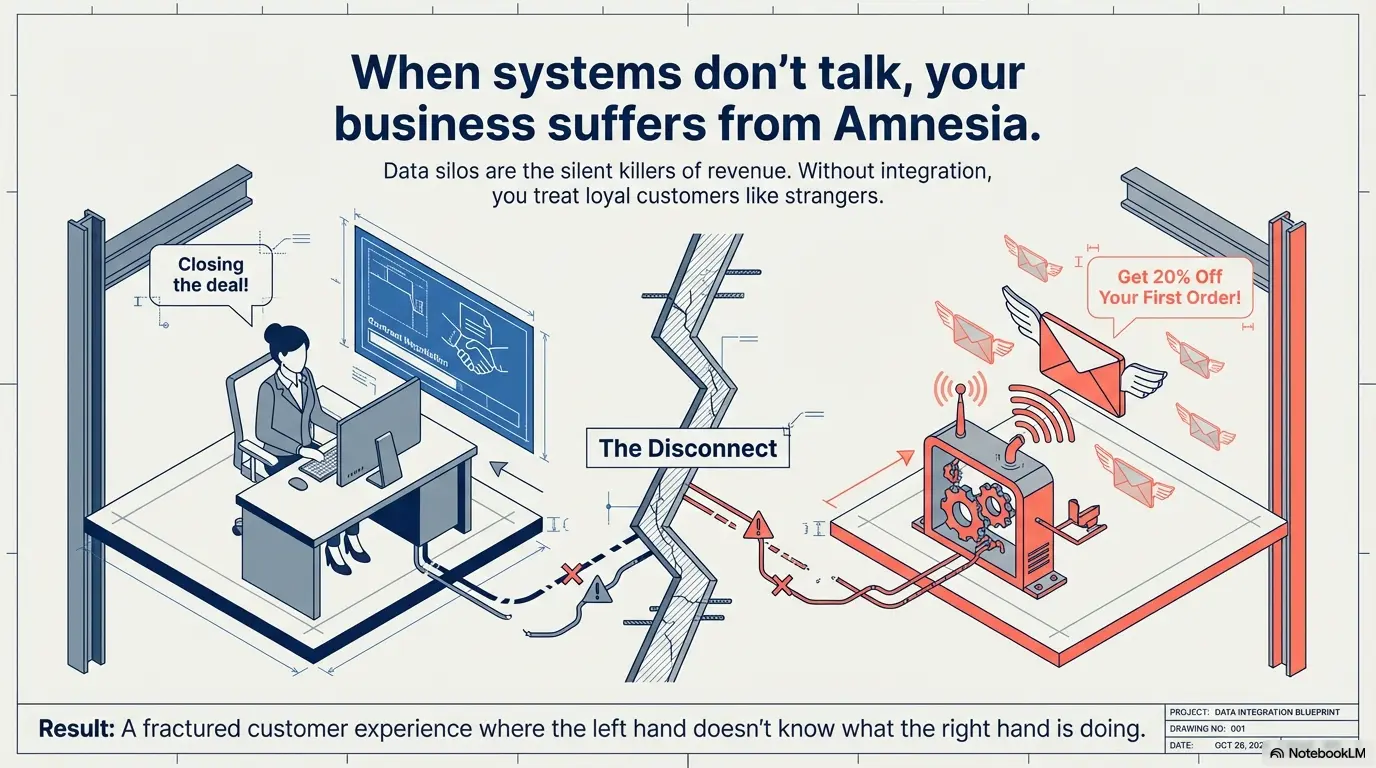
When these two systems are disconnected, your business suffers from “amnesia.” Sales reps don’t know a prospect just opened five marketing emails. Marketers don’t know a lead just became a customer and should stop receiving “Buy Now” offers.
Integrating your CRM with your email marketing tool solves this. It creates a single source of truth, automates manual busywork, and allows for hyper-personalized communication at scale.
This comprehensive, step-by-step guide covers everything from the technical “how-to” to the strategic “why,” designed for decision-makers and implementers alike.
Defining the Core Technologies
Before integrating, it is critical to understand the distinct role each tool plays in your stack.
What is a CRM?
A CRM (e.g., Salesforce, HubSpot, Zoho) is a database of relationships. It tracks one-to-one interactions: phone calls, meeting notes, deal stages, and contract values. It is the “brain” of your sales operations. Many organizations rely on Zoho Recruit integrations to connect recruitment data with their broader CRM and communication stack.
What is an Email Marketing Tool?
An Email Marketing Tool (e.g., Mailchimp, Klaviyo, ActiveCampaign) is a platform for one-to-many communication. It handles design templates, deliverability infrastructure (ensuring emails don’t hit spam), and mass automation rules. It is the “voice” of your marketing.
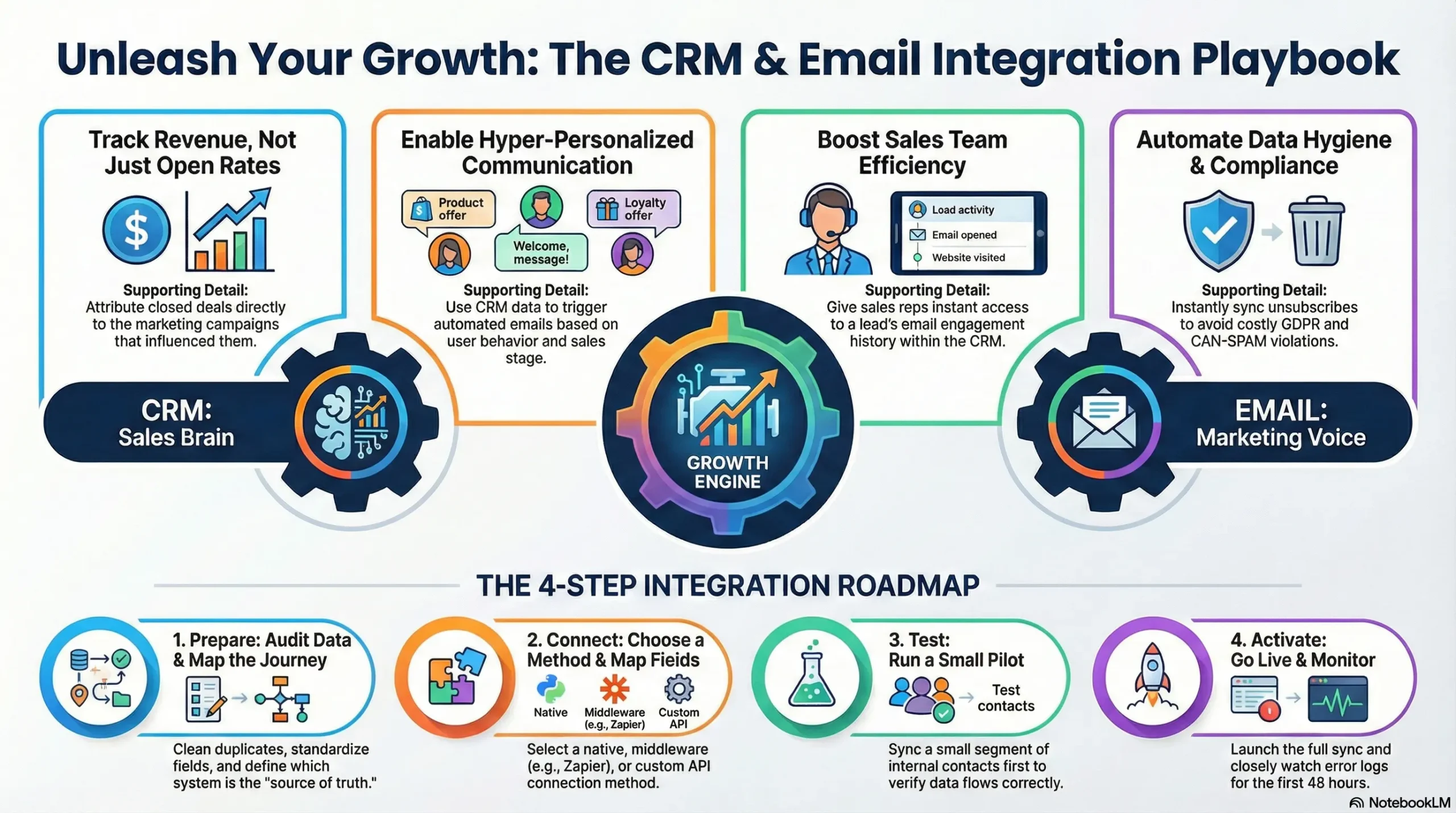
The Goal of Integration: To connect the “brain” with the “voice,” ensuring that what you say to a customer is always informed by what you know about them.
Why Integration is Non-Negotiable: The Strategic Benefits
If you are still exporting CSV files from your CRM and uploading them to your email tool manually, you are losing money. Here is why integration is essential.
A. Closed-Loop Reporting (Revenue Attribution)
Without integration, marketers track “Open Rates.” With integration, they track “Revenue Generated.” You can see exactly which email campaign influenced a lead that eventually closed a deal in the CRM six months later.
B. Hyper-Personalization
Generic blasts get ignored. Integrated data allows for “behavioral segmentation.”
- Scenario: A prospect visits your pricing page but doesn’t book a meeting.
- Result: The integration tags them in the email tool, triggering a specific case study email relevant to their industry.
C. Improving Sales Efficiency
Sales reps waste hours digging for context. An integration pushes email activity (opens, clicks) directly into the CRM contact record. A rep can see, “Oh, John read our security whitepaper yesterday; I should bring up security in our call today.”
D. Data Hygiene & Compliance
Manual uploads lead to human error. Integration ensures that if a user unsubscribes in your email tool, that preference is instantly reflected in the CRM, protecting you from GDPR/CAN-SPAM violations.
Pre-Integration Checklist: Do Not Skip This
Rushing into technical setup without preparation creates a “garbage in, garbage out” disaster.
Step 1: Data Audit & Cleaning
- De-duplicate: Run a duplicate check in your CRM. If you have two “John Smiths,” the integration will get confused.
- Standardize Fields: Ensure data follows the same format. If your CRM uses “United States” but your email tool uses “USA,” the sync will fail.
Step 2: Define the “Source of Truth”
You must decide which system wins if there is a conflict.
- Contact Details (Phone, Company): Master Source = CRM.
- Subscription Preferences (Opt-in/Opt-out): Master Source = Email Tool.
Step 3: Map Your Customer Journey
Draw out what you want to happen.
- “When a lead moves to ‘Negotiation’ stage in CRM, stop all marketing emails.”
- “When a customer spends over $1,000, move them to the VIP email list.”
Step-by-Step Integration Framework
Here is the practical workflow for connecting your systems.
Phase 1: Choosing the Connection Method
There are three ways to bridge the gap:
- Native Integration: (Recommended) The software provider built the connection themselves (e.g., the “Salesforce” app inside Mailchimp). It is usually free and stable.
- Middleware (iPaaS): Using tools like Zapier, Make, or Tray.io. Best if a native integration doesn’t exist or if you need complex custom logic.
- Custom API: Hiring a developer to write code connecting the two tools. Expensive, but offers 100% control.
Phase 2: Field Mapping
This is the most critical technical step. You must “teach” the systems which fields correspond to each other.
| CRM Field | Direction | Email Tool Field | Notes |
| First Name | ↔ (Two-way) | F_NAME | Bi-directional allows corrections in either tool. |
| Email Address | ↔ (Two-way) | The unique identifier (Key). | |
| Lead Status | → (One-way) | Tag / Segment | CRM dictates the status; Email tool reacts. |
| Last Purchase Date | → (One-way) | Custom Date Field | Used for “Re-order reminder” emails. |
| Unsubscribe Status | ← (One-way) | Opt-out Field | Email tool dictates compliance. |
Phase 3: The Pilot Test
Never sync your entire database on day one.
- Create a “Test Segment” in your CRM with 5 internal contacts (you and your team).
- Run the sync for only that segment.
- Change a phone number in the CRM. Check if it updates in the email tool.
- Unsubscribe one test contact in the email tool. Check if the CRM marks them as “Opted Out.”
Phase 4: Full Sync & Monitoring
Once the pilot succeeds, turn on the full sync. Monitor the “Error Log” closely for the first 48 hours. Common initial errors include “Invalid Email Format” or “API Rate Limit Exceeded.”
Advanced Strategies: Utilizing the Integration
Now that the pipes are connected, how do you use the water?
Strategy A: The “Deal Stage” Exclusion
The Problem: Nothing kills a deal faster than a generic “20% off” coupon sent to a prospect who is about to sign a $50k contract.
The Fix: Create a dynamic suppression list in your email tool: Exlude all contacts where CRM Opportunity Stage = “Negotiation” or “Proposal Sent”.
Strategy B: Lead Scoring Automation
Use email engagement to prioritize sales calls.
- Logic: If a lead clicks a link in an email, add +10 points to their CRM Lead Score.
- Trigger: When Lead Score > 100, create a “Call Task” for the sales rep in the CRM.
Strategy C: Post-Purchase Onboarding
The Logic:
- CRM Deal moves to “Closed/Won.”
- Integration triggers “New Customer” tag in Email Tool.
- Email Tool starts a 30-day “Welcome to the Family” educational sequence.
Troubleshooting Common Issues
Even the best integrations encounter friction. Here is how to solve the top 3 problems.
Problem 1: The “Sync Loop”
- Symptom: Data keeps reverting to an old value.
- Cause: Both systems are trying to update each other simultaneously.
- Solution: Set a strict “Winner” for each field. If CRM is the master for “Name,” the Email Tool should never be allowed to overwrite the CRM’s version of “Name.”
Issue 2: API Limits
- Symptom: The sync stops working in the middle of the day.
- Cause: You exceeded the number of allowed data calls (common in Salesforce & HubSpot lower tiers).
- Solution: Reduce sync frequency from “Real-time” to “Every 15 minutes” or “Overnight.”
Problem 3: Duplicate Records
- Symptom: A customer receives the same email twice.
- Cause: The user signed up with
john@company.comand laterjohn.doe@company.com. The CRM sees two people. - Solution: Use a “Fuzzy Matching” logic in your CRM to merge contacts that share similar names and domains.
Conclusion
Integrating a CRM with email marketing tools is a maturity milestone for any business. It shifts your marketing from reactive (blasting lists and hoping for the best) to proactive (sending the right message based on real-time data).
Actionable Next Step:
Start with an audit. Before you look at software connectors, open your CRM and your Email tool side-by-side. List the 5 data points you wish moved between them automatically. That is your roadmap.

Integrating your CRM with email marketing tools isn’t just a time-saver, it really does allow for more meaningful engagement with customers at the right time. Personalization goes a long way in building customer trust.