Can I Block Someone on LinkedIn From Seeing My Profile?
Yes, you can block someone on LinkedIn so they can no longer view your profile, send you messages, or interact with you on the platform. LinkedIn provides a built-in blocking feature that helps users protect their privacy and control who can access their professional information.
Blocking is useful if you want to avoid unwanted contact, spam messages, or uncomfortable interactions while maintaining a professional online presence.
What Happens When You Block Someone on LinkedIn?
When you block a person, LinkedIn limits all interaction between both accounts.
After blocking:
- They cannot view your profile
- They cannot send messages or connection requests
- You will not see their profile or updates
- They are removed from your connections (if connected)
- They are not notified that you blocked them
This makes blocking a private and effective way to manage your visibility.
How to Block Someone on LinkedIn (Step-by-Step)
Follow these simple steps:
- Open LinkedIn
- Go to the person’s profile
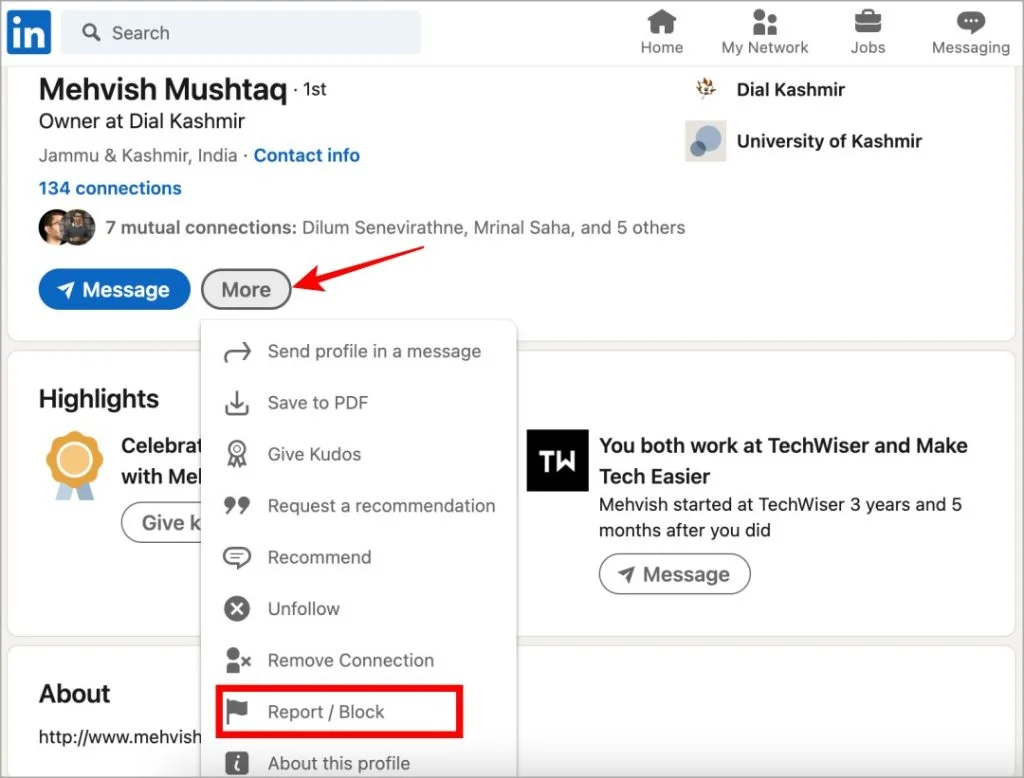
- Click the More button (three dots)
- Select Report or Block
- Click Block
- Enter your LinkedIn password
- Confirm the action
The person will immediately lose access to your profile.
How to Unblock Someone on LinkedIn
If you change your mind later, you can unblock them.
Steps:
- Go to Settings & Privacy
- Select Visibility
- Open Blocking
- Find the person’s name
- Click Unblock
- Enter your password
Note: After unblocking, you must send a new connection request if needed.
Reasons People Block Users on LinkedIn
Common reasons include:
- Spam or promotional messages
- Harassment or unwanted contact
- Privacy concerns
- Competitor monitoring
- Personal preference
Blocking helps maintain a safe professional environment.
Alternative Privacy Options
If you don’t want to fully block someone, you can also:
- Turn on private profile viewing
- Remove them from connections
- Restrict profile visibility
- Adjust profile privacy settings
These options provide more control without blocking completely.
Final Thoughts
Yes, LinkedIn allows you to block someone from seeing your profile easily and privately. The feature ensures you remain in control of your professional network and online visibility. Whether for privacy or comfort, blocking is a simple way to manage your LinkedIn experience safely.