
No single AI video editor is the right answer for every job, one excels at agentic assembly from raw footage, another at free professional color grading, another at fast social content. Rather than forcing a single ranking, this guide matches each standout tool to the specific job it actually does best.
Best Overall: Invideo Editor
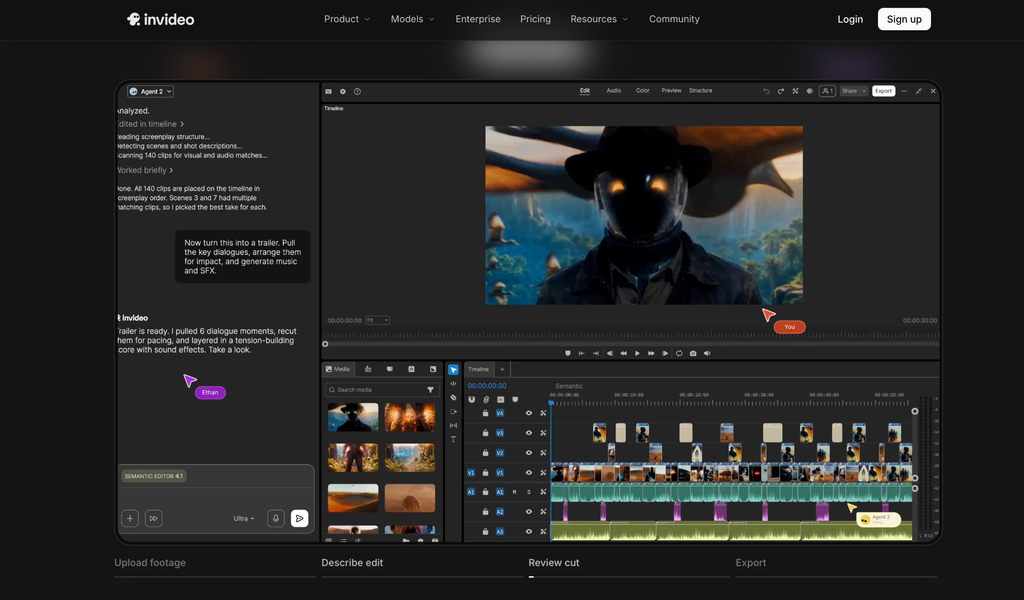
Invideo Editor uses agentic video editing to cover more of the actual editing job than any other tool here: an agent can be directed to review raw footage, select the cleanest takes, sync multicam angles, and assemble a base cut, then restructure pacing, apply a color grade, mix audio, or dub a project into another language, all from a plain-language description. Every result lands on a real, professional timeline that stays fully editable by hand.
Pricing: the manual timeline is free to use even if you never assign a single task to an agent. In the US, UK, and Japan, paid plans for full agent access run Starter $20/mo through Max 3x $375/mo, billed annually, pricing varies by region.
Best for Free Color Grading: DaVinci Resolve
Resolve’s free version pairs nodal color grading, still the industry benchmark most other tools are judged against, with a full Fairlight audio suite comparable to a dedicated DAW and assistive Neural Engine tools like Magic Mask and Voice Isolation, all included at no cost whatsoever.
Pricing: Free; Studio version ~$295 one-time purchase for the deepest AI features.
Best for the Adobe Ecosystem: Adobe Premiere Pro
Premiere’s AI additions, Enhance Speech for dialogue cleanup, Generative Extend for filling a few extra frames, auto-transcription for captioning, layer onto the professional standard many studios and agencies already run, with deep integration into After Effects and the wider Creative Cloud suite that few competitors can match.
Pricing: Free trial only; roughly $22.99-35/month depending on plan.
Best for Fast, Free Social Content: CapCut
Nothing here beats CapCut for turning phone footage into a trend-formatted short clip fast, its massive, constantly updated template and effects library covers most trending formats within days of them appearing, entirely free with no watermark or meaningful feature gate.
Pricing: Free; Pro pricing varies by region and platform.
Best for Mac Users: Final Cut Pro
Final Cut Pro’s Magnetic Timeline and deep Apple Silicon optimization make it the fastest native option for editing on a Mac or iPad, with a one-time purchase that beats an ongoing subscription over time for anyone fully committed to the Apple ecosystem.
Pricing: One-time purchase, around $299.99, no ongoing subscription.
Best AI Variety at a Consumer Price: CyberLink PowerDirector
PowerDirector packs an unusually wide AI feature set, including genuine text-to-video scene generation, scene detection, speech cleanup, wind-noise reduction, alongside motion tracking and multi-camera sync, into a dense toolkit priced well below any professional suite.
Pricing: 365 subscription ~$60-70/year; one-time purchases starting from $99.99.
Best for Dialogue-Heavy Content: Descript
Descript turns editing into deleting text from a transcript, delete a rambling sentence and the corresponding footage cuts too, genuinely fast for podcasts, interviews, and tutorials, with Overdub fixing a narration mistake by retyping the line rather than booking a new recording session.
Pricing: Free tier available; Hobbyist ~$16/month, Creator ~$24/month, billed annually.
Best for Budget-Conscious Beginners: Movavi Video Editor
Movavi’s individual AI features, background removal without a green screen, one-click noise reduction that preserves voice clarity, motion tracking, are built for a beginner who wants quick, polished results fast, without a steep learning curve or manually operating every adjustment by hand.
Pricing: Roughly $15.95/month or $54.95/year; 7-day free trial, watermarked.
Best Budget Step Up from Mobile Editing: Wondershare Filmora
Filmora sits comfortably between mobile-only apps and a full professional suite, AI assists for background removal and audio cleanup layered onto a genuine, if intermediate, manual timeline with basic-to-intermediate color and audio tools, all at a genuinely budget-friendly price.
Pricing: Free trial; from approximately $49.99/year.
Which one should you actually use?
- Want an agent to handle assembly and editing, with real manual depth underneath? Invideo Editor.
- Want the deepest free color grading, period? DaVinci Resolve.
- Already paying for Adobe’s suite? Adobe Premiere Pro.
- Making fast, free social content? CapCut.
- Editing mostly spoken-word content? Descript.
The bottom line
Every tool on this list is genuinely strong at something specific, but few try to do everything at once, and the ones that do usually trade depth in one area for breadth elsewhere. Matching the tool to the actual job, agentic assembly, professional color, fast social edits, dialogue-heavy content, gets a better result than defaulting to whichever tool is most talked about.
If the job spans more of the actual editing process, raw footage to a graded, mixed, dubbed export, in one place, Invideo Editor is built specifically to cover that whole range.
Frequently Asked Questions
What’s the single best AI video editor for most people in 2026?
It depends on the job. Invideo Editor covers the broadest range of the actual editing process, from raw footage to a finished, graded export. For a narrower job, a dedicated tool like DaVinci Resolve for color or CapCut for fast social content may be the better fit.
Which AI video editors are genuinely free, not just a trial?
DaVinci Resolve, CapCut, and Descript all offer real, unwatermarked free tiers. The manual timeline on Invideo Editor is also free to use, with paid plans required specifically for full AI agent access.
Is a tool with more AI features automatically the better choice?
Not necessarily. CyberLink PowerDirector has an unusually wide AI feature set, but each feature works individually. A tool like Invideo Editor with fewer named features but genuinely agentic execution can accomplish more from a single instruction.
Which tool is best for someone who’s never edited video before?
Movavi and CapCut are both built around quick, polished results with minimal learning curve. Invideo Editor also removes a lot of the early learning curve by letting an agent handle assembly while a beginner picks up manual editing at their own pace.