How Do You Delete a LinkedIn Connection?
Deleting a LinkedIn connection is a simple way to manage your professional network and keep your connections relevant. If you no longer want to stay connected with someone, LinkedIn allows you to remove a connection privately without notifying the other person.
This feature helps maintain a clean and professional network aligned with your career goals.
What Happens When You Remove a LinkedIn Connection?
When you delete a connection:
- They are removed from your connections list
- You will no longer see their private updates
- They cannot message you directly (unless connected again)
- LinkedIn does not notify them
- You can reconnect later if needed
Removing a connection is completely private.
How to Delete a LinkedIn Connection (Desktop)
Follow these steps:
- Open LinkedIn
- Click My Network
- Select Connections
- Find the person you want to remove
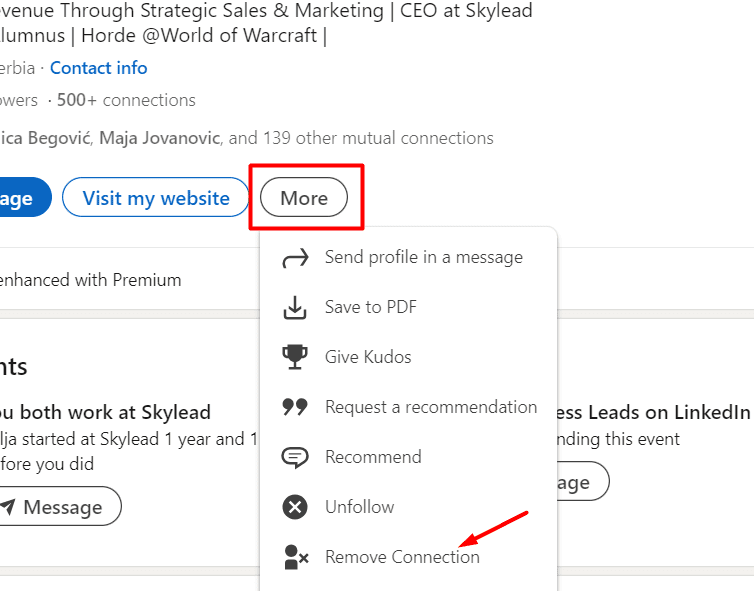
- Click the three dots next to their name
- Select Remove connection
- Confirm your choice
The connection will be removed immediately.
How to Delete a Connection on LinkedIn (Mobile App)
If you are using the LinkedIn app:
- Open the LinkedIn app
- Go to the person’s profile
- Tap the More button (three dots)
- Select Remove connection
- Confirm
The person will no longer appear in your network.
Reasons to Remove a LinkedIn Connection
People remove connections for many reasons, such as:
- Irrelevant professional interests
- Spam or promotional messages
- Career changes
- Privacy concerns
- Cleaning up their network
Keeping meaningful connections improves networking quality.
Difference Between Removing and Blocking
It’s important to understand the difference:
- Remove connection: Ends connection but profile remains visible
- Block: Completely prevents profile viewing and interaction
Choose blocking only if you want full restriction.
Tips for Managing Your LinkedIn Network
To keep your network strong:
- Connect with relevant professionals
- Review connections regularly
- Avoid random connection requests
- Maintain professional relationships
A focused network can improve career opportunities.
Final Thoughts
Deleting a LinkedIn connection is quick, private, and useful for maintaining a professional network. Whether you want to organize your contacts or remove inactive connections, LinkedIn makes the process easy and discreet.