
Your website is your hardest-working salesperson — yet most businesses ignore it until something breaks. Here’s the uncomfortable truth: a slow, outdated, or confusing site quietly bleeds revenue every single day. But before you greenlight a costly website redesign, stop.The real question isn’t whether your site needs work — it’s what kind.
Redesign vs. optimization isn’t just a technical debate; it’s a strategic business decision that directly impacts your bottom line. Some sites need a complete digital overhaul. Others simply need smarter conversion rate optimization and faster load times. Understanding which path fits your situation saves you thousands of dollars and months of wasted effort. Let’s break it down.
Understanding the Basics: Redesign vs. Optimization
Website redesign vs optimization starts with knowing what each actually means. A website redesign is a full-scale overhaul. You’re rebuilding the structure, rethinking the visual identity, and often switching platforms altogether. Think of it like tearing down a house and constructing a new one from the ground up. It’s bold, expensive, and time-consuming — but sometimes it’s exactly what a site needs. Brand modernization, new navigation systems, and rebuilt codebases all fall under this umbrella. Aligning your visual branding with updated company values often necessitates this level of comprehensive transformation to ensure consistency across every touchpoint.
Website optimization, on the other hand, is precision work. You identify specific pain points — slow load times, weak CTAs, poor mobile experience — and fix them without touching the rest of the site. It’s faster, cheaper, and far less risky. Conversion rate optimization, SEO optimization, and speed improvements are classic examples. Neither approach is inherently superior. The right choice depends entirely on your site’s current state and your business objectives.
| Feature | Redesign | Optimization |
| Scope | Full site overhaul | Targeted fixes |
| Cost | $10K – $100K+ | $500 – $10K |
| Timeline | 3 – 9 months | 2 – 12 weeks |
| SEO Risk | Moderate to High | Low |
| Best For | Structural problems | Performance gaps |

Signs Your Website May Need a Redesign
Some problems run too deep for a quick fix. When your site was built on outdated website technology — think legacy CMS platforms, deprecated plugins, or non-responsive frameworks — optimization can only do so much. You’re essentially polishing a cracked foundation. If your bounce rate sits above 70% despite decent traffic, if your site looks embarrassingly dated next to competitors, or if your brand has fundamentally shifted, a redesign isn’t a luxury — it’s a necessity.
Digital strategy alignment demands that your website reflect where your business is today, not where it was three years ago. If your platform can’t scale, can’t handle new integrations, or actively repels mobile users, you’ve crossed into redesign territory. Platform upgrade considerations matter here too. Migrating from an old WordPress build or a custom-coded relic to a modern, scalable CMS is often the smartest long-term move. The pain is short-term. The payoff is years of better performance. Agencies that need to deliver modern website experiences without expanding their internal design capacity can also work with Mavlers Agency for white label web design services, allowing them to provide website design and redesign support under their own brand.
Redesign Readiness Checklist:
| Signal | Severity |
| Site looks outdated visually | High |
| Built on legacy/deprecated technology | Critical |
| Brand identity has changed significantly | High |
| Mobile experience is completely broken | Critical |
| Competitors’ sites are far more modern | Medium |
| Site architecture confuses users | High |
| CMS can’t support needed features | Critical |
Indicators That Optimization Might Be Enough
Not every underperforming site needs a full rebuild. If your site is relatively modern but still missing targets, optimization vs full rebuild is often a straightforward decision — optimization wins. Slow page speeds, weak meta descriptions, poor internal linking and link building, and low-converting landing pages are fixable problems. They don’t require burning everything down. A focused performance bottleneck resolution strategy can deliver results in weeks, not months.
User experience enhancement through targeted UX fixes is wildly underrated. Sometimes a single CTA change, a streamlined checkout flow, or a faster homepage load time is all it takes to shift conversion numbers dramatically. Continuous platform improvement — making small, data-driven tweaks on a regular cadence — often outperforms a one-time redesign in pure ROI terms. If your Google PageSpeed score is below 50 but your design is clean and your brand is intact, optimization is your fastest path forward.
💡 “If your foundation is solid but your results aren’t, you probably don’t need a wrecking ball — just a smarter toolkit.”

Pros and Cons of Redesigning Your Site
A redesign gives you a genuine fresh start. You can implement sustainable web design principles from day one — clean code, accessible structure, mobile-first architecture, and scalable systems. Minimalist website design trends dominate modern web development precisely because they load faster, convert better, and age more gracefully. A full redesign also lets you fix structural UX problems that no amount of optimization can address. It’s transformational in a way that incremental improvements simply aren’t.
But the cost and risk of redesign are real. Projects routinely run over budget. Timelines stretch. And if you’re not careful, a redesign can temporarily tank your SEO services for rankings — especially if URL structures change and redirects aren’t handled meticulously. Operational risk management during a redesign requires serious planning: content audits, redirect maps, pre-launch QA testing, and post-launch monitoring all need to be locked in before you go live. Skipping any of these steps turns a smart investment into an expensive headache. Similarly, creating indoor maps for your office or physical space requires careful planning to ensure visitors can navigate smoothly, find key locations easily, and enjoy a seamless experience from arrival to destination.
| Pros of Redesign | Cons of Redesign |
| Fixes deep structural issues | High upfront cost |
| Enables brand modernization | Long timeline (3–9 months) |
| Supports platform scalability | Temporary SEO risk |
| Fresh UX from the ground up | Requires significant resources |
| Better long-term ROI potential | Scope creep is common |
Pros and Cons of Optimization
Optimization benefits and limitations tell an interesting story. On the plus side, optimization is fast, affordable, and data-driven. You’re making decisions based on real user behavior — heatmaps, session recordings, A/B test results — rather than guesses. Technical complexity reduction is another major benefit. You’re simplifying specific problem areas without introducing wholesale change across the site. SEO equity stays intact. Rankings don’t drop. And you can start seeing results in weeks.
The limitations kick in when the problems are structural. Technical debt evaluation often reveals that years of patchwork fixes have created a fragile, bloated codebase that costs more to optimize than to rebuild. Traffic loss mitigation becomes difficult when the root cause is a fundamentally broken user journey or an outdated platform that simply can’t deliver modern performance. Optimization is a powerful tool — but it has a ceiling. And sometimes, that ceiling is lower than site owners want to admit.
| Pros of Optimization | Cons of Optimization |
| Fast results (weeks not months) | Can’t fix structural flaws |
| Low cost and low risk | Incremental, not transformational |
| Preserves SEO equity | May create “franken-site” over time |
| Data-driven decision making | Limited by platform capabilities |
| Easy to test and iterate | Results plateau eventually |
Evaluating ROI: Which Approach Delivers the Best Results?
Redesign ROI analysis requires honest math. A full redesign might cost $30,000 upfront — but if it doubles your conversion rate and you’re generating $500K annually, the payback period could be under a year. Financial impact evaluation should factor in not just the cost of the project but the cost of inaction. Every month your site underperforms, you’re leaving revenue on the table. That lost revenue is just as real as the invoice from your web agency.
User engagement strategies built into a redesign — better content marketing hierarchy, faster load times, cleaner navigation — tend to compound over time. Optimization delivers quicker wins but smaller ones. Tools like Google Analytics,Hotjar, and SEMrush give you the data you need to run this calculation accurately. Business objective alignment is the real north star here. If your goal is rapid conversion improvement on a tight budget, optimize. If your goal is long-term market positioning and scalability, redesign.
| Metric | Redesign (Avg.) | Optimization (Avg.) |
| Upfront Cost | $10K – $80K | $500 – $10K |
| Time to Results | 6 – 12 months | 4 – 12 weeks |
| Conversion Lift | 20% – 200% | 10% – 80% |
| SEO Risk | Moderate – High | Low |
| Long-Term Value | Very High | Moderate – High |
Technical Considerations Before You Decide
Technical debt evaluation is where many site owners get surprised. A site can look perfectly fine on the surface while hiding thousands of lines of spaghetti code underneath. Before you decide between website redesign vs optimization, run a full technical audit. Check your Core Web Vitals in Google Search Console. Run your site through GTmetrix and Screaming Frog. Look at your CMS — can it even support the changes optimization requires? Platform scalability assessment at this stage saves you from making the wrong call.
SEO performance optimization also depends heavily on your technical foundation. If your site lacks HTTPS, has duplicate content issues, or fails basic accessibility standards under WCAG 2.1, you may need a redesign to fix these properly. Agile methodology in web projects is worth considering here too. Rather than a single massive redesign launch, some teams break the project into sprints — shipping improvements incrementally while keeping the live site stable. This reduces risk dramatically and keeps post-launch monitoring manageable.
Special Cases: eCommerce and High-Traffic Sites
eCommerce growth challenges
Create unique pressure on the redesign vs. optimization decision. For online stores, every design change directly affects revenue. Migration strategy for eCommerce must account for product catalog continuity, payment gateway compatibility, and customer account data preservation. Making ecommerce software development a critical factor in ensuring a seamless and efficient transition. MLP strategy in eCommerce — building a Minimum Lovable Product — is gaining traction as a smarter alternative to full-blown redesigns. You ship a leaner, better version of the site, gather real data, then iterate fast.
AR/VR immersive eCommerce experience
Features and ethical AI for websites — like personalization engines and smart search — are becoming competitive necessities for high-traffic stores. These technologies often can’t be bolted onto legacy platforms. They require a modern architecture to function properly. eCommerce platform improvement through optimization works well for speed and conversion tweaks but hits a hard wall when the platform itself can’t support next-generation features. If you’re on WooCommerce and need Shopify’s ecosystem, optimization won’t bridge that gap — migration will.
What eCommerce Sites Should Consider Before Redesigning or Optimizing
MVP approach for redesign makes particular sense for eCommerce businesses. Rather than relaunching your entire store at once, prioritize your highest-revenue pages — homepage, category pages, product pages, and checkout. Fix those first. Online presence improvement through focused eCommerce optimization on these pages can lift revenue by 15–30% without a full rebuild. Cart abandonment rate, revenue per visitor, and average order value are your key diagnostic metrics. If these numbers are struggling despite a modern platform, conversion rate optimization is your lever. If the platform itself is the bottleneck, it’s time to migrate.
“Don’t let perfect be the enemy of better. Sometimes optimizing your top five pages beats a year-long redesign project.” — Common CRO wisdom
Pre-launch QA testing for eCommerce redesigns must cover every user journey — from product discovery to post-purchase confirmation. One broken checkout flow on launch day can wipe out weeks of revenue. Build a full test matrix. Cover desktop, mobile, and tablet. Test every payment method. Then monitor obsessively in the first 30 days post-launch, because post-launch monitoring is where most redesign problems surface and where fast teams pull ahead of slow ones.
Making the Final Decision: Redesign or Optimization?
Redesign decision factors ultimately come down to three things: severity of the problem, size of your budget, and patience of your timeline. Use this framework to cut through the noise. If your site’s core structure is broken — confusing navigation, non-responsive layout, platform that can’t scale — that’s a redesign signal. If your design is solid but your numbers are weak, optimization vs full rebuild tips toward optimization every time. Digital strategy alignment means your website decision should serve your next 3–5 year business plan, not just next quarter. To build that long-term vision with clarity, many founders now turn to an AI business plan generator to map out goals before committing to major digital investments. A well-structured plan ensures your website strategy aligns with real growth targets, not assumptions.
A hybrid approach often makes the most sense. Optimize aggressively right now to stop the bleeding. Plan a phased redesign for 6–12 months out, informed by the data your optimization work generates. This continuous platform improvement model reduces risk, maintains SEO equity, and ensures your redesign is data-driven rather than gut-driven. Agile methodology in web projects supports exactly this kind of iterative progress — small wins stacking up to big transformations.
Quick Decision Framework:
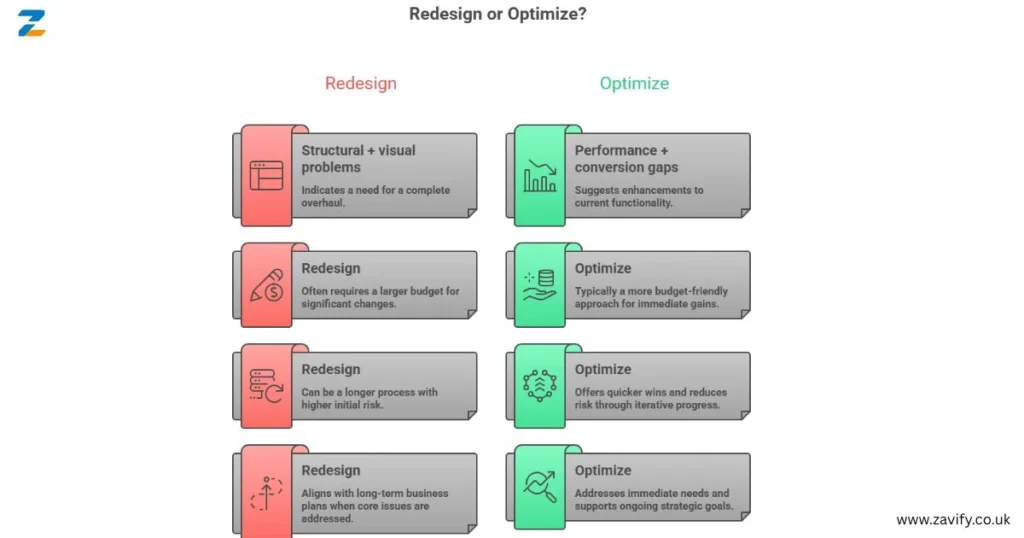
✅ Structural + visual problems? → Redesign
✅ Performance + conversion gaps? → Optimize
✅ Both issues present? → Hybrid phased approach
✅ Budget under $5K? → Optimize first, redesign later
✅ Platform can’t scale? → Redesign/migrate
Next Steps and Maintaining Your Site Long-Term
Starting with a comprehensive audit is non-negotiable. UseScreaming Frog for technical crawls,Google Search Console for SEO health, andHotjar for user behavior data. This audit tells you exactly what’s broken and how badly. From there, build a 90-day roadmap — whether that’s an optimization sprint or a redesign kickoff plan. User engagement strategies built around real data will always outperform those built on assumptions.
Long-term, sustainable web design means treating your site as a living product, not a one-time project. Revisit the redesign vs. optimization question every 18–24 months. Technology moves fast. User expectations shift. What felt modern in 2022 can feel stale by 2025. Continuous adaptation of platforms — through regular content refreshes, performance audits, and incremental UX improvements — keeps your site competitive without requiring a massive redesign every few years. Build that rhythm into your marketing calendar and your site will never fall this far behind again.
Conclusion
The redesign vs. optimization decision doesn’t have a universal answer. It has the right answer for your site, your goals, and your resources. Some sites desperately need the full overhaul. Others just need smarter, more focused improvements. The worst outcome is choosing based on fear, trend, or a vendor’s sales pitch rather than real data.
Let your analytics lead. Let your business objectives guide. And let this framework give you the clarity to act decisively. Whether you optimize aggressively or redesign strategically, the goal is the same: a faster, smarter, better-converting website that serves your customers and grows your business. Start with an audit. The data will tell you everything you need to know.
Click For More Information At: Zavify LTD
FAQs
Q1: What is the main difference between a website redesign and optimization?
A redesign is a full structural and visual overhaul of your site. Optimization targets specific underperforming elements — speed, SEO, UX, conversions — without rebuilding the whole thing.
Q2: How much does a full website redesign cost in the USA?
Costs range widely. A small business redesign typically runs $5,000–$20,000. Mid-market projects land between $20,000–$80,000. Enterprise-level rebuilds can exceed $150,000.
Q3: Can I improve my Google rankings without a redesign?
Absolutely. SEO performance optimization — fixing technical issues, improving content, building links, and boosting Core Web Vitals — can significantly lift rankings without touching your site’s design.
Q4: How long does website optimization take to show results?
Yes — and it’s often the smartest approach. Optimize high-priority pages now while planning a phased redesign in parallel.
Q5: How do I know if my website needs a redesign or just better SEO?
Run a full audit first. If technical SEO issues are causing underperformance, optimize. If structural, visual, or platform limitations are the root cause, redesign.